PNJ
Construit un maillage à partir de surfaces paramétriques.
Structure du projet attendue
MSLearn/
├── Renderer/
│   └── MathFunction.hpp   ←
MeshBuilder_shared.h
└── …
/// C++ — MeshBuilder_shared.h — update:23/10/26
#ifndef MeshBuilder_shared_h
#define MeshBuilder_shared_h
#include <simd/simd.h>
// Pièces animées : chaque sommet appartient à une pièce, chaque pièce a sa matrice monde
#define PART_BODY 0
#define PART_EYE 1
#define PART_ANTENNA 2
#define PART_ARM_L 3
#define PART_ARM_R 4 // le bras laser
#define PART_THRUSTER 5
#define PART_LASER 6 // le rayon (cylindre unité étiré jusqu'au cube visé)
#define PART_COUNT 8
// Matériaux : la palette vit dans les uniforms, les sommets n'en portent que l'index
#define MAT_SHELL 0
#define MAT_ORANGE 1
#define MAT_GRAPHITE 2
#define MAT_EYE 3
#define MAT_CUBE 4 // le petit cube au bout de l'antenne
#define MAT_THRUSTER 5
#define MAT_LASER 6
#define MAT_METAL 7
#define MAT_COUNT 8
struct MeshBuilderVertex // tu as déjà cette structure
{
simd::float3 position; // espace modèle de la pièce
simd::float3 normal;
uint32_t part;
uint32_t material;
};
struct MeshBuilderMaterial
{
simd::float4 albedoRoughness; // rgb : albedo, a : rugosité
simd::float4 emissiveMetallic; // rgb : émission (déjà multipliée par l'intensité), a : métal
};
struct MeshBuilderUniforms
{
simd::float4x4 viewProjectionMatrix;
simd::float4 cameraPosition; // xyz
simd::float4 sunDirection; // xyz : vers le soleil
simd::float4x4 parts[PART_COUNT]; // pièce → monde
MeshBuilderMaterial materials[MAT_COUNT];
};
#endif /* MeshBuilder_shared_h *//// C++ — PNJ.hpp — update:23/10/26
#ifndef Pnj_hpp
#define Pnj_hpp
#include <simd/simd.h>
#include <array>
#include <vector>
#include <Metal/Metal.hpp>
#include "Math.hpp"
#include "FrameClock.hpp"
#include "NonCopyable.hpp"
#include "MeshBuilder.hpp"
#include "MathFunction.hpp"
#include "../includes/SharedGPU/Renderer_shared.h"
#include "../includes/SharedGPU/MeshBuilder_shared.h"
constexpr simd::float3 kEyePivot = { 0.f, 0.03f, 0.27f };
constexpr simd::float3 kAntennaPivot = { 0.07f, 0.28f, -0.06f };
constexpr simd::float3 kShoulderL = { -0.30f, -0.04f, 0.02f };
constexpr simd::float3 kShoulderR = { 0.30f, -0.04f, 0.02f };
constexpr simd::float3 kLaserTipLocal = { 0.40f, -0.20f, 0.245f };
// Ce que le drone fait en ce moment, par ordre de priorité décroissante
enum class PnjTask
{
Return, // trop loin du joueur : il revient à pleine vitesse
Escort // rien à faire : il tourne autour du joueur
};
// Ce que le PNJ a besoin de savoir du monde à chaque frame
struct PnjContext
{
simd::float3 playerPosition; // pieds
simd::float2 beacon; // xz de la balise
bool hasBeacon = false;
};
// Drone compagnon : une bulle volante aux formes rondes, avec une antenne et son petit cube lumineux.
// Il plane à 3 blocs du sol, ne dépasse jamais sa vitesse maximale, et rend service : il nettoie le
// nanogel, récolte les minerais à découvert et montre le chemin de la balise.
class Pnj : NonCopyable
{
public:
static constexpr float kMaxSpeed = 23.f; // m/s, jamais dépassée
static constexpr float kAcceleration = 12.f; // m/s² : il accélère et freine en douceur
static constexpr float kHoverHeight = 3.f; // blocs au-dessus du sol
static constexpr float kLaserRange = 15.f; // portée du rayon
Pnj(MTL::Device*, MTL::Library*, MTL::PixelFormat, MTL::PixelFormat, simd::float3 spawn);
void update(const FrameTime&, const PnjContext& context);
void draw(MTL::RenderCommandEncoder*, const GlobalUniforms&) const;
simd::float3 getPosition() const { return m_position; }
PnjTask getTask() const { return m_task; }
const char* getTaskName() const;
float getSpeed() const { return simd::length(m_velocity); }
private:
void buildPipeline(MTL::Device*, MTL::Library*,
MTL::PixelFormat, MTL::PixelFormat);
void buildGeometry(MTL::Device*);
void updateParts(const FrameTime& time);
// GPU
NS::SharedPtr<MTL::RenderPipelineState> m_pipeline;
NS::SharedPtr<MTL::DepthStencilState> m_depthStencilState;
NS::SharedPtr<MTL::Buffer> m_vertexBuffer;
NS::SharedPtr<MTL::Buffer> m_indexBuffer;
NS::UInteger m_indexCount = 0;
simd::int3 m_probeOrigin = { 0, 0, 0 };
bool m_probeReady = false;
std::array<simd::float4x4, PART_COUNT> m_parts;
std::array<MeshBuilderMaterial, MAT_COUNT> m_materials;
// Comportement
PnjTask m_task = PnjTask::Escort;
float m_rescanTimer = 0.f;
bool m_hasTarget = false;
simd::int3 m_targetCell = { 0, 0, 0 };
uint16_t m_targetVoxel = 0;
float m_mineProgress = 0.f; // 0 → 1 : le cube cède
float m_cooldown = 0.f;
bool m_laserOn = false;
simd::float3 m_lastPlayer = { 0.f, 0.f, 0.f };
float m_playerSpeed = 0.f; // lissée, pour savoir si le joueur marche
// Flight
simd::float3 m_position;
simd::float3 m_velocity = { 0.f, 0.f, 0.f };
simd::float3 m_acceleration = { 0.f, 0.f, 0.f };
float m_yaw = 0.f; // 0 = regarde vers +z
simd::float2 m_antennaSway = { 0.f, 0.f }; // ressort amorti, poussé par l'accélération
simd::float2 m_antennaSpeed = { 0.f, 0.f };
simd::float3 m_laserTip = { 0.f, 0.f, 0.f }; // monde, mis à jour avec les pièces
simd_quatf m_armAim = simd_quaternion(0.f, 0.f, 0.f, 1.f); // orientation lissée du bras laser
};
#endif /* PNJ_hpp */La géométrie, le pipeline et la fonction de dessin
/// C++ — PNJ.cpp — update:27/10/26

  constexpr float kTurnSpeed     = 1.89f;    // rad/s
  constexpr float kSteerGain     = 4.89f;   // vitesse voulue = écart × gain (ralentit en approchant)
  constexpr float kCleanupRadius = 16.f;    // nanogel à moins de 6 m du joueur
  constexpr float kHarvestRadius = 5.f;   // minerais à moins de 14 m du joueur
  constexpr float kStandOff      = 2.23f;    // distance horizontale gardée avec le cube visé
  constexpr float kRescanPeriod  = 0.4f;

#include "PNJ.hpp"

Pnj::Pnj(MTL::Device* device, MTL::Library* shaderLibrary,
         MTL::PixelFormat pixelFormat, MTL::PixelFormat depthPixelFormat, simd::float3 spawn)
: m_position(spawn), m_lastPlayer(spawn)
{
    buildPipeline(device, shaderLibrary, pixelFormat, depthPixelFormat);
    buildGeometry(device);

    m_parts.fill(matrix_identity_float4x4);
}

void Pnj::buildPipeline(MTL::Device* device, MTL::Library* shaderLibrary,
                        MTL::PixelFormat pixelFormat, MTL::PixelFormat depthPixelFormat)
{
    auto vertexDescriptor = NS::TransferPtr(MTL::VertexDescriptor::alloc()->init());
    auto attributes = vertexDescriptor->attributes();
    attributes->object(0)->setFormat(MTL::VertexFormatFloat3);
    attributes->object(0)->setOffset(offsetof(MeshBuilderVertex, position));
    attributes->object(1)->setFormat(MTL::VertexFormatFloat3);
    attributes->object(1)->setOffset(offsetof(MeshBuilderVertex, normal));
    attributes->object(2)->setFormat(MTL::VertexFormatUInt2);
    attributes->object(2)->setOffset(offsetof(MeshBuilderVertex, part));
    for (NS::UInteger i = 0; i < 3; ++i)
        attributes->object(i)->setBufferIndex(0);
    vertexDescriptor->layouts()->object(0)->setStride(sizeof(MeshBuilderVertex));

    auto vertexFunction   = NS::TransferPtr(shaderLibrary->newFunction(MTLSTR("vertex_pnj")));
    auto fragmentFunction = NS::TransferPtr(shaderLibrary->newFunction(MTLSTR("fragment_pnj")));

    auto descriptor = NS::TransferPtr(MTL::RenderPipelineDescriptor::alloc()->init());
    descriptor->setLabel(MTLSTR("PNJ"));
    descriptor->setVertexFunction(vertexFunction.get());
    descriptor->setFragmentFunction(fragmentFunction.get());
    descriptor->setVertexDescriptor(vertexDescriptor.get());
    descriptor->colorAttachments()->object(0)->setPixelFormat(pixelFormat);
    descriptor->setDepthAttachmentPixelFormat(depthPixelFormat);

    NS::Error* error = nullptr;
    m_pipeline = NS::TransferPtr(device->newRenderPipelineState(descriptor.get(), &error));
    if (!m_pipeline)
        std::printf("PNJ : pipeline impossible : %s\n", error ? error->localizedDescription()->utf8String() : "?");

    auto depthDescriptor = NS::TransferPtr(MTL::DepthStencilDescriptor::alloc()->init());
    depthDescriptor->setDepthCompareFunction(MTL::CompareFunctionLess);
    depthDescriptor->setDepthWriteEnabled(true);
    m_depthStencilState = NS::TransferPtr(device->newDepthStencilState(depthDescriptor.get()));
}

void Pnj::buildGeometry(MTL::Device* device)
{
  MeshBuilder mesh;

    // Corps : une bulle blanche coiffée d'un dôme orange, ceinturée d'un anneau graphite
    mesh.buildEllipsoid({ 0.f, 0.f, 0.f },   { 0.32f, 0.28f, 0.32f }, PART_BODY, MAT_SHELL, 36);
    mesh.buildEllipsoid({ 0.f, 0.13f, 0.f }, { 0.27f, 0.17f, 0.27f }, PART_BODY, MAT_ORANGE, 36);
    mesh.buildTorus({ 0.f, 0.f, 0.f }, kUp, 0.315f, 0.03f, PART_BODY, MAT_GRAPHITE);
    mesh.buildEllipsoid({ 0.f, -0.25f, 0.f }, { 0.12f, 0.06f, 0.12f }, PART_BODY, MAT_GRAPHITE);   // tuyère

    // Œil : un grand globe lumineux dans sa lunette, avec une pupille qui suit ce qu'il regarde
    mesh.buildTorus({ 0.f, 0.03f, 0.30f }, { 0.f, 0.f, 1.f }, 0.1f, 0.028f, PART_BODY, MAT_GRAPHITE);
    mesh.buildEllipsoid(kEyePivot, { 0.085f, 0.085f, 0.085f }, PART_EYE, MAT_EYE);
    mesh.buildEllipsoid({ 0.f, 0.03f, 0.348f }, { 0.03f, 0.03f, 0.012f }, PART_EYE, MAT_GRAPHITE, 16);

    // Antenne + le petit cube, comme sur le premier robot
    mesh.buildCapsule(kAntennaPivot, kAntennaPivot + simd::float3{ 0.f, 0.24f, 0.f }, 0.012f, PART_ANTENNA, MAT_GRAPHITE);
    mesh.buildCube(kAntennaPivot + simd::float3{ 0.f, 0.275f, 0.f }, 0.035f, PART_ANTENNA, MAT_CUBE);

    // Bras : gauche avec une main ronde, droit avec l'émetteur laser
    mesh.buildCapsule(kShoulderL, { -0.40f, -0.20f, 0.10f }, 0.04f, PART_ARM_L, MAT_METAL);
    mesh.buildEllipsoid({ -0.40f, -0.20f, 0.10f }, { 0.055f, 0.055f, 0.055f }, PART_ARM_L, MAT_ORANGE, 20);
    mesh.buildCapsule(kShoulderR, { 0.40f, -0.20f, 0.10f }, 0.04f, PART_ARM_R, MAT_METAL);
    mesh.buildEllipsoid({ 0.40f, -0.20f, 0.10f }, { 0.055f, 0.055f, 0.055f }, PART_ARM_R, MAT_ORANGE, 20);
    mesh.buildCapsule({ 0.40f, -0.20f, 0.10f }, { 0.40f, -0.20f, 0.22f }, 0.022f, PART_ARM_R, MAT_GRAPHITE);
    mesh.buildEllipsoid({ 0.40f, -0.20f, 0.232f }, { 0.018f, 0.018f, 0.018f }, PART_ARM_R, MAT_LASER, 12);

    // Anneau de poussée sous le corps, qui tourne
    mesh.buildTorus({ 0.f, -0.29f, 0.f }, kUp, 0.11f, 0.025f, PART_THRUSTER, MAT_THRUSTER);

    // Le rayon laser
    mesh.unitCylinder(PART_LASER, MAT_LASER);

    m_indexCount   = mesh.indices.size();
    m_vertexBuffer = NS::TransferPtr(device->newBuffer(mesh.vertices.data(), mesh.vertices.size() * sizeof(MeshBuilderVertex), MTL::ResourceStorageModeShared));
    m_indexBuffer  = NS::TransferPtr(device->newBuffer(mesh.indices.data(), mesh.indices.size() * sizeof(uint32_t), MTL::ResourceStorageModeShared));
}

void Pnj::draw(MTL::RenderCommandEncoder* renderEncoder, const GlobalUniforms& globals) const
{
    if (!m_pipeline)
        return;

    MeshBuilderUniforms uniforms;
    uniforms.viewProjectionMatrix = globals.cameraUniforms.viewProjectionMatrix;
    uniforms.cameraPosition       = globals.sun.cameraPosition;
    uniforms.sunDirection         = globals.sun.sunDirection;
    std::copy(m_parts.begin(), m_parts.end(), uniforms.parts);
    std::copy(m_materials.begin(), m_materials.end(), uniforms.materials);

    renderEncoder->pushDebugGroup(MTLSTR("Pnj"));
    renderEncoder->setRenderPipelineState(m_pipeline.get());
    renderEncoder->setDepthStencilState(m_depthStencilState.get());
    renderEncoder->setFrontFacingWinding(MTL::WindingClockwise);
    renderEncoder->setCullMode(MTL::CullModeBack);
    renderEncoder->setVertexBuffer(m_vertexBuffer.get(), 0, 0);
    renderEncoder->setVertexBytes(&uniforms, sizeof(uniforms), 1);
    renderEncoder->setFragmentBytes(&uniforms, sizeof(uniforms), 1);
    renderEncoder->drawIndexedPrimitives(MTL::PrimitiveTypeTriangle, m_indexCount, MTL::IndexTypeUInt32, m_indexBuffer.get(), 0);
    renderEncoder->setCullMode(MTL::CullModeNone);
    renderEncoder->popDebugGroup();
}
Place au shader
/// MSL — PNJ.metal — update:29/10/26
#include <metal_stdlib>
#include "../includes/SharedGPU/MeshBuilder_shared.h"
#import "PBR.metal"

using namespace metal;

struct PnjVertexIn
{
  float3 position     [[attribute(0)]];
  float3 normal       [[attribute(1)]];
  uint2  partMaterial [[attribute(2)]]; // x : pièce, y : matériau
};

struct PnjVertexOut
{
  float4 position [[position]];
  float3 worldPosition;
  float3 worldNormal;
  uint   material [[flat]];
};

vertex PnjVertexOut vertex_pnj(PnjVertexIn         in       [[stage_in]],
                               constant MeshBuilderUniforms& uniforms [[buffer(1)]])
{ // Chaque pièce a sa matrice monde (corps, œil, antenne, bras, réacteur, rayon)
  float4x4 part          = uniforms.parts[in.partMaterial.x];
  float4   worldPosition = part * float4(in.position, 1.0f);

  PnjVertexOut out;
  out.position      = uniforms.viewProjectionMatrix * worldPosition;
  out.worldPosition = worldPosition.xyz;
  out.worldNormal   = (part * float4(in.normal, 0.0f)).xyz;
  out.material      = in.partMaterial.y;
  return out;
}

fragment float4 fragment_pnj(PnjVertexOut          in       [[stage_in]],
                             constant MeshBuilderUniforms& uniforms [[buffer(1)]])
{
  MeshBuilderMaterial   material  = uniforms.materials[in.material];
  float3        albedo    = material.albedoRoughness.rgb;
  float         roughness = max(material.albedoRoughness.a, 0.05f);
  float3        emissive  = material.emissiveMetallic.rgb;
  float         metallic  = material.emissiveMetallic.a;

  float3 N = normalize(in.worldNormal);
  float3 V = normalize(uniforms.cameraPosition.xyz - in.worldPosition);
  float3 L = normalize(uniforms.sunDirection.xyz);
  float3 H = normalize(V + L);
  float  NdotL = max(dot(N, L), 0.0f);
  float  NdotV = max(dot(N, V), 1e-4f);

  // Même soleil et même ciel que le monde voxel (lighting() dans VoxelWorld.metal)
  float3 sunLight     = float3(1.0f, 0.92f, 0.8f) * saturate(L.y * 3.0f + 0.1f) * 2.2f;
  float3 ambientLight = mix(float3(0.05f, 0.06f, 0.11f), float3(0.40f, 0.50f, 0.70f), saturate(L.y * 2.0f + 0.3f));
  ambientLight *= 0.75f + 0.25f * N.y;

  // Diffus (Lambert, comme les voxels) + spéculaire Cook-Torrance : c'est lui qui fait « rond et brillant »
  float3 F0       = mix(float3(0.04f), albedo, metallic);
  float3 F        = fresnelSchlick(max(dot(H, V), 0.0f), F0);
  float3 specular = distributionGGX(N, H, roughness) *
                      geometrySmith(N, V, L, roughness) *
                        F / (4.0f * NdotV * max(NdotL, 1e-4f));

  float3 diffuse  = albedo * (1.0f - metallic) * (1.0f - F);

  // Reflet du ciel sur les bords (fresnel) : souligne les volumes arrondis
  float3 skyReflection = fresnelSchlickRoughness(NdotV, F0, roughness) * ambientLight;

  float3 color = (diffuse + specular) * sunLight * NdotL
               + diffuse * ambientLight
               + skyReflection
               + emissive;
  return float4(color, 1.0f); // linéaire : la cible est en RGBA16Float
}
Intégration
/// C++ — Renderer.hpp — update:29/10/26
#include "PNJ.hpp"

public:
Pnj                         m_pnj;
/// C++ — Renderer.cpp — update:29/10/26 — constructeur
m_pnj(m_device, m_shaderLibrary, m_pixelFormat, m_depthPixelFormat, simd::float3{ 0.f, 89.f, 0.f })/// C++ — Renderer.cpp — update:29/10/26 — draw()
m_pnj.draw(renderCommandEncoder, m_globalUniforms);Mets à jour ton rendu
/// C++ — PNJ.cpp — update:30/10/26
void Pnj::update(const FrameTime& time, const PnjContext& context)
{ // Vitesse de la caméra, lissée
  if (time.delta > 0.f)
  {
    const simd::float3 moved = context.playerPosition - m_lastPlayer;
    const float        speed = simd::length(simd::float2{ moved.x, moved.z }) / time.delta;
    m_playerSpeed += (std::min(speed, 50.f) - m_playerSpeed) * (1.f - std::exp(-time.delta * 4.f));
  }
  m_lastPlayer = context.playerPosition;
  const simd::float3 toPlayer = context.playerPosition - m_position;
  const float        distance = simd::length(simd::float2{ toPlayer.x, toPlayer.z });

  if (distance > 890.f) // trop loin de la caméra : il revient
  {
    m_task      = PnjTask::Return;
    m_hasTarget = false;
    return;
  }

  const float  t    = time.elapsed;
  const float  dt   = time.delta;
  simd::float3 goal = context.playerPosition;
  switch (m_task)
  {
    case PnjTask::Return:
      break;
    case PnjTask::Escort:
    {   // Orbite lente autour du joueur
      const float angle = time.elapsed * 0.5f;
      goal = context.playerPosition + simd::float3{ std::cos(angle), 0.f, std::sin(angle) } * 3.f;
      break;
    }
  }
  goal.y = context.playerPosition.y + 3.0; // 3 unités au dessus de la caméra

  // Pilotage : vitesse voulue proportionnelle à l'écart, accélération bornée, vitesse bornée
  const simd::float3 desired = clampLength((goal - m_position) * kSteerGain, kMaxSpeed);
  m_acceleration = clampLength((desired - m_velocity) / std::max(dt, 1e-4f), kAcceleration);
  m_velocity     = clampLength(m_velocity + m_acceleration * dt, kMaxSpeed);   // la vitesse maximale, garantie
  m_position    += m_velocity * dt;

  simd::float3 look = context.playerPosition - m_position;
  if (m_hasTarget)
      look = cellCenter(m_targetCell) - m_position;
  else if (simd::length(simd::float2{ m_velocity.x, m_velocity.z }) > 1.f)
      look = m_velocity;
  if (simd::length(simd::float2{ look.x, look.z }) > 1e-3f)
  {
      const float error = wrapAngle(std::atan2(look.x, look.z) - m_yaw);
      m_yaw = wrapAngle(m_yaw + std::clamp(error, -kTurnSpeed * dt, kTurnSpeed * dt));
  }

  const simd::float3 forward = { std::sin(m_yaw), 0.f, std::cos(m_yaw) };
  const simd::float3 right   = { std::cos(m_yaw), 0.f, -std::sin(m_yaw) }; // up × forward

  // Inclinaison : il se penche dans le sens de la marche et s'incline dans les virages
  const float pitch = std::clamp(simd::dot(m_velocity, forward) * 0.05f, -0.35f, 0.35f);
  const float roll  = std::clamp(-simd::dot(m_velocity, right) * 0.05f, -0.35f, 0.35f);
  const float bob   = std::sin(t * 2.2f) * 0.05f;
  const simd::float4x4 body = math::makeTranslate(m_position + simd::float3{ 0.f, bob, 0.f })
                            * rotation(m_yaw, kUp) * rotation(pitch, kAxisX) * rotation(roll, kAxisZ);
  const simd::float4x4 bodyInverse = simd::inverse(body);
  m_parts[PART_BODY] = body;

  // Ce qu'il regarde, dans son propre repère
  const simd::float3 lookAt    = m_hasTarget ? cellCenter(m_targetCell) : m_lastPlayer + simd::float3{ 0.f, 1.6f, 0.f };
  const simd::float3 lookLocal = simd::normalize(transformPoint(bodyInverse, lookAt) - kEyePivot);
  auto pivot = [](simd::float3 at, const simd::float4x4& m) { return math::makeTranslate(at) * m * math::makeTranslate(-at); };

  // Œil : la pupille suit la cible, et il cligne de temps en temps
  const float eyeYaw   = std::clamp(std::atan2(lookLocal.x, lookLocal.z), -0.5f, 0.5f);
  const float eyePitch = std::clamp(-std::asin(std::clamp(lookLocal.y, -1.f, 1.f)), -0.4f, 0.4f);
  const float blink    = std::fmod(t, 3.7f) < 0.12f ? 0.15f : 1.f;
  m_parts[PART_EYE] = body * pivot(kEyePivot, rotation(eyeYaw, kUp) * rotation(eyePitch, kAxisX)
                                                    * math::makeScale({ 1.f, blink, 1.f }));


  // Palette : les émissifs vivent (œil plus vif quand il mine, cube qui pulse, réacteur selon la vitesse)
  const simd::float3 cyan   = { 0.25f, 0.85f, 1.f };
  const float        speed  = simd::length(m_velocity) / kMaxSpeed;
  auto material = [](simd::float3 albedo, float roughness, float metallic, simd::float3 emissive = 0.f)
  {
      return MeshBuilderMaterial{ { albedo.x, albedo.y, albedo.z, roughness }, { emissive.x, emissive.y, emissive.z, metallic } };
  };
  m_materials[MAT_SHELL]    = material(simd::float3{ 0.85f, 0.85f, 0.82f }, 0.3f, 0.f);
  m_materials[MAT_ORANGE]   = material(simd::float3{ 1.f, 0.37f, 0.12f }, 0.35f, 0.f);
  m_materials[MAT_GRAPHITE] = material(simd::float3{ 0.05f, 0.05f, 0.06f }, 0.45f, 0.5f);
  m_materials[MAT_EYE]      = material(simd::float3{ 0.1f, 0.3f, 0.4f }, 0.1f, 0.f, cyan * (m_laserOn ? 3.5f : 2.f));
  m_materials[MAT_CUBE]     = material(simd::float3{ 0.1f, 0.3f, 0.4f }, 0.2f, 0.f, cyan * (1.5f + std::sin(t * 3.f)));
  m_materials[MAT_THRUSTER] = material(simd::float3{ 0.1f, 0.2f, 0.3f }, 0.3f, 0.f, cyan * (0.8f + 3.f * speed));
  m_materials[MAT_LASER]    = material(simd::float3{ 1.f, 0.4f, 0.2f }, 0.5f, 0.f, simd::float3{ 1.f, 0.37f, 0.12f } * (m_laserOn ? 8.f : 0.6f));
  m_materials[MAT_METAL]    = material(simd::float3{ 0.7f, 0.72f, 0.75f }, 0.25f, 0.9f);
}
/// C++ — Renderer.cpp — update:29/10/26 — update()
m_pnj.update(time, PnjContext{ position, { 0.f, 0.f }, true });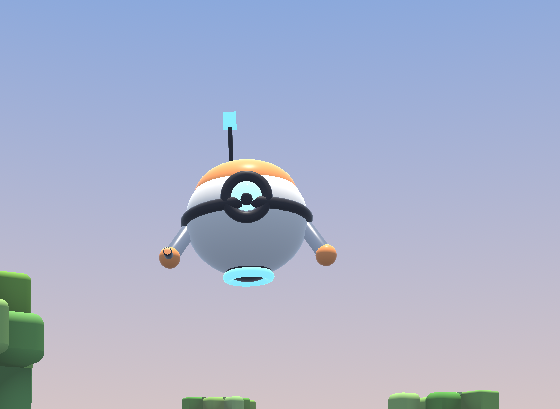
Bonus : le style du drone
Le drone est fini, mais son rendu peut encore changer de caractère sans toucher à sa géométrie. Deux effets, cumulables, qu'on fait défiler avec la touche O : normal → contour noir → contour + fil de fer stylé.
1. Le contour noir : la coque inversée
L'idée est vieille comme le cel-shading : on dessine le drone deux fois. La première fois, gonflé le long de ses normales, en noir, en ne gardant que ses faces arrière. La seconde, normalement, par-dessus. Le drone normal recouvre presque toute la coque gonflée ; seul le liseré qui dépasse de la silhouette reste visible.
- Pourquoi les faces arrière ? Les faces avant de la coque gonflée seraient devant le drone et le cacheraient en noir. Ses faces arrière sont toujours derrière lui : elles ne se voient qu'au bord. D'où
setCullMode(MTL::CullModeFront)pour cette passe. - Pourquoi gonfler à l'écran ? Gonfler en mètres donnerait un trait épais de près et invisible de loin. On pousse le sommet après la projection, dans la direction de sa normale à l'écran, d'une épaisseur fixe : multipliée par
clip.w, la division perspective l'annule, et le trait garde la même largeur à toute distance. - Pourquoi
aspect? En NDC, l'écran fait 2 unités de large et 2 de haut, mais pas le même nombre de pixels. Sans correction, le trait serait plus fin sur les côtés qu'en haut et en bas.
/// C++ — MeshBuilder_shared.h — update:08/11/26 — trois champs à la fin de MeshBuilderUniforms
struct MeshBuilderUniforms
{
  simd::float4x4 viewProjectionMatrix;
  simd::float4   cameraPosition;        // xyz
  simd::float4   sunDirection;          // xyz : vers le soleil
  simd::float4x4 parts[PART_COUNT];     // pièce → monde
  MeshBuilderMaterial materials[MAT_COUNT];
  simd::float4   outlineColor;          // rgb : couleur du contour, a : épaisseur (fraction de la hauteur d'écran)
  simd::float4   wireColor;             // rgb : couleur du fil de fer, a : épaisseur en pixels (0 = éteint)
  float          aspect;                // largeur / hauteur : même épaisseur en x et en y
};
/// MSL — PNJ.metal — update:08/11/26 — à la fin du fichier
struct PnjOutlineOut
{
  float4 position [[position]];
};

vertex PnjOutlineOut vertex_pnj_outline(PnjVertexIn                   in       [[stage_in]],
                                        constant MeshBuilderUniforms& uniforms [[buffer(1)]])
{
  float4x4 part   = uniforms.parts[in.partMaterial.x];
  float4   clip   = uniforms.viewProjectionMatrix * (part * float4(in.position, 1.0f));
  float4   normal = uniforms.viewProjectionMatrix * float4(normalize((part * float4(in.normal, 0.0f)).xyz), 0.0f);

  // La direction de la normale à l'écran, mesurée en pixels (x compte `aspect` fois plus de pixels que y)
  float2 direction = normal.xy * float2(uniforms.aspect, 1.0f);
  float  length2D  = length(direction);
  direction = length2D > 1e-5f ? direction / length2D : float2(0.0f);
  direction.x /= uniforms.aspect;

  // × 2 : l'écran fait 2 unités de haut en NDC. × w : la division perspective l'annulera
  clip.xy += direction * (2.0f * uniforms.outlineColor.a) * clip.w;

  PnjOutlineOut out;
  out.position = clip;
  return out;
}

fragment float4 fragment_pnj_outline(constant MeshBuilderUniforms& uniforms [[buffer(1)]])
{
  return float4(uniforms.outlineColor.rgb, 1.0f);
}
Côté C++, le pipeline du contour est la même que celle du drone : même format de sommets, mêmes cibles. On change seulement les deux fonctions et on en crée une seconde, juste après la première.
/// C++ — PNJ.cpp — update:08/11/26 — buildPipeline(), avec la pipeline du contour
void Pnj::buildPipeline(MTL::Device* device, MTL::Library* shaderLibrary,
                        MTL::PixelFormat pixelFormat, MTL::PixelFormat depthPixelFormat)
{
    auto vertexDescriptor = NS::TransferPtr(MTL::VertexDescriptor::alloc()->init());
    auto attributes = vertexDescriptor->attributes();
    attributes->object(0)->setFormat(MTL::VertexFormatFloat3);
    attributes->object(0)->setOffset(offsetof(MeshBuilderVertex, position));
    attributes->object(1)->setFormat(MTL::VertexFormatFloat3);
    attributes->object(1)->setOffset(offsetof(MeshBuilderVertex, normal));
    attributes->object(2)->setFormat(MTL::VertexFormatUInt2);
    attributes->object(2)->setOffset(offsetof(MeshBuilderVertex, part));
    for (NS::UInteger i = 0; i < 3; ++i)
        attributes->object(i)->setBufferIndex(0);
    vertexDescriptor->layouts()->object(0)->setStride(sizeof(MeshBuilderVertex));

    auto vertexFunction   = NS::TransferPtr(shaderLibrary->newFunction(MTLSTR("vertex_pnj")));
    auto fragmentFunction = NS::TransferPtr(shaderLibrary->newFunction(MTLSTR("fragment_pnj")));

    auto descriptor = NS::TransferPtr(MTL::RenderPipelineDescriptor::alloc()->init());
    descriptor->setLabel(MTLSTR("PNJ"));
    descriptor->setVertexFunction(vertexFunction.get());
    descriptor->setFragmentFunction(fragmentFunction.get());
    descriptor->setVertexDescriptor(vertexDescriptor.get());
    descriptor->colorAttachments()->object(0)->setPixelFormat(pixelFormat);
    descriptor->setDepthAttachmentPixelFormat(depthPixelFormat);

    NS::Error* error = nullptr;
    m_pipeline = NS::TransferPtr(device->newRenderPipelineState(descriptor.get(), &error));
    if (!m_pipeline)
        std::printf("PNJ : pipeline impossible : %s\n", error ? error->localizedDescription()->utf8String() : "?");

    // Le contour : même format de sommets, mêmes cibles, seules les deux fonctions changent
    auto outlineVertex   = NS::TransferPtr(shaderLibrary->newFunction(MTLSTR("vertex_pnj_outline")));
    auto outlineFragment = NS::TransferPtr(shaderLibrary->newFunction(MTLSTR("fragment_pnj_outline")));
    descriptor->setLabel(MTLSTR("PNJ outline"));
    descriptor->setVertexFunction(outlineVertex.get());
    descriptor->setFragmentFunction(outlineFragment.get());
    m_outlinePipeline = NS::TransferPtr(device->newRenderPipelineState(descriptor.get(), &error));
    if (!m_outlinePipeline)
        std::printf("PNJ : pipeline du contour impossible : %s\n", error ? error->localizedDescription()->utf8String() : "?");

    auto depthDescriptor = NS::TransferPtr(MTL::DepthStencilDescriptor::alloc()->init());
    depthDescriptor->setDepthCompareFunction(MTL::CompareFunctionLess);
    depthDescriptor->setDepthWriteEnabled(true);
    m_depthStencilState = NS::TransferPtr(device->newDepthStencilState(depthDescriptor.get()));
}
/// C++ — PNJ.cpp — update:08/11/26 — draw(), en deux passes
void Pnj::draw(MTL::RenderCommandEncoder* renderEncoder, const GlobalUniforms& globals) const
{
    if (!m_pipeline)
        return;

    MeshBuilderUniforms uniforms;
    uniforms.viewProjectionMatrix = globals.cameraUniforms.viewProjectionMatrix;
    uniforms.cameraPosition       = globals.sun.cameraPosition;
    uniforms.sunDirection         = globals.sun.sunDirection;
    std::copy(m_parts.begin(), m_parts.end(), uniforms.parts);
    std::copy(m_materials.begin(), m_materials.end(), uniforms.materials);
    // Style (touche O) : contour noir de 2,5 ‰ de la hauteur d'écran, fil de fer cyan de 1,2 pixel
    uniforms.outlineColor         = { 0.02f, 0.02f, 0.03f, m_style >= 1 ? 0.0025f : 0.f };
    uniforms.wireColor            = { 0.25f, 0.85f, 1.f, m_style >= 2 ? 1.2f : 0.f };
    // L'aspect se lit dans la projection : [0][0] = f / aspect, [1][1] = f
    const simd::float4x4& projection = globals.cameraUniforms.projectionMatrix;
    uniforms.aspect               = projection.columns[0][0] != 0.f ? projection.columns[1][1] / projection.columns[0][0] : 1.f;

    renderEncoder->pushDebugGroup(MTLSTR("Pnj"));
    renderEncoder->setDepthStencilState(m_depthStencilState.get());
    renderEncoder->setFrontFacingWinding(MTL::WindingClockwise);
    renderEncoder->setVertexBuffer(m_vertexBuffer.get(), 0, 0);
    renderEncoder->setVertexBytes(&uniforms, sizeof(uniforms), 1);
    renderEncoder->setFragmentBytes(&uniforms, sizeof(uniforms), 1);
    if (m_style >= 1 && m_outlinePipeline)
    { // 1. La coque gonflée : on ne garde que ses faces arrière, le drone viendra se poser devant
        renderEncoder->setRenderPipelineState(m_outlinePipeline.get());
        renderEncoder->setCullMode(MTL::CullModeFront);
        renderEncoder->drawIndexedPrimitives(MTL::PrimitiveTypeTriangle, m_indexCount, MTL::IndexTypeUInt32, m_indexBuffer.get(), 0);
    }
    // 2. Le drone, normalement, par-dessus
    renderEncoder->setRenderPipelineState(m_pipeline.get());
    renderEncoder->setCullMode(MTL::CullModeBack);
    renderEncoder->drawIndexedPrimitives(MTL::PrimitiveTypeTriangle, m_indexCount, MTL::IndexTypeUInt32, m_indexBuffer.get(), 0);
    renderEncoder->setCullMode(MTL::CullModeNone);
    renderEncoder->popDebugGroup();
}
Des normales lisses. Le cube de l'antenne a une normale par face : à chaque arête, les trois faces se gonflent dans trois directions différentes et le contour s'ouvre en fente. Pour un contour parfait sur une forme à arêtes vives, on stocke une seconde normale « moyenne » par sommet, réservée au contour.
Tous les autres objets qui partagent fragment_pnj (le shiba) doivent remplir ces champs : une structure non initialisée en C++ contient n'importe quoi, et le shiba se retrouverait avec un fil de fer aléatoire.
2. Le fil de fer stylé
setTriangleFillMode(MTL::TriangleFillModeLines) dessine bien les arêtes, mais en traits d'un pixel, crénelés et sans épaisseur. Pour un fil de fer qui a du style, avec un trait de couleur bordé de noir, on le calcule dans le fragment shader.
Metal donne à chaque pixel sa coordonnée barycentrique : trois poids qui disent où il se trouve dans son triangle. Le premier vaut 1 sur le premier sommet et 0 sur l'arête opposée ; idem pour les deux autres. Le plus petit des trois mesure donc la distance à l'arête la plus proche. Divisé par sa variation d'un pixel à l'autre (fwidth), il devient une distance en pixels : le trait garde la même épaisseur quelle que soit la taille du triangle à l'écran.
/// MSL — PNJ.metal — update:08/11/26 — fragment_pnj, avec le fil de fer
fragment float4 fragment_pnj(PnjVertexOut          in          [[stage_in]],
                             float3                barycentric [[barycentric_coord]],   // où l'on est dans le triangle
                             constant MeshBuilderUniforms& uniforms [[buffer(1)]])
{
  MeshBuilderMaterial   material  = uniforms.materials[in.material];
  float3        albedo    = material.albedoRoughness.rgb;
  float         roughness = max(material.albedoRoughness.a, 0.05f);
  float3        emissive  = material.emissiveMetallic.rgb;
  float         metallic  = material.emissiveMetallic.a;

  float3 N = normalize(in.worldNormal);
  float3 V = normalize(uniforms.cameraPosition.xyz - in.worldPosition);
  float3 L = normalize(uniforms.sunDirection.xyz);
  float3 H = normalize(V + L);
  float  NdotL = max(dot(N, L), 0.0f);
  float  NdotV = max(dot(N, V), 1e-4f);

  // Même soleil et même ciel que le monde voxel (lighting() dans VoxelWorld.metal)
  float3 sunLight     = float3(1.0f, 0.92f, 0.8f) * saturate(L.y * 3.0f + 0.1f) * 2.2f;
  float3 ambientLight = mix(float3(0.05f, 0.06f, 0.11f), float3(0.40f, 0.50f, 0.70f), saturate(L.y * 2.0f + 0.3f));
  ambientLight *= 0.75f + 0.25f * N.y;

  // Diffus (Lambert, comme les voxels) + spéculaire Cook-Torrance : c'est lui qui fait « rond et brillant »
  float3 F0       = mix(float3(0.04f), albedo, metallic);
  float3 F        = fresnelSchlick(max(dot(H, V), 0.0f), F0);
  float3 specular = distributionGGX(N, H, roughness) *
                      geometrySmith(N, V, L, roughness) *
                        F / (4.0f * NdotV * max(NdotL, 1e-4f));

  float3 diffuse  = albedo * (1.0f - metallic) * (1.0f - F);

  // Reflet du ciel sur les bords (fresnel) : souligne les volumes arrondis
  float3 skyReflection = fresnelSchlickRoughness(NdotV, F0, roughness) * ambientLight;

  float3 color = (diffuse + specular) * sunLight * NdotL
               + diffuse * ambientLight
               + skyReflection
               + emissive;

  if (uniforms.wireColor.a > 0.0f)
  { // Une barycentrique vaut 0 sur l'arête opposée ; divisée par sa variation d'un pixel, c'est une distance en pixels
    float3 pixels   = barycentric / max(fwidth(barycentric), float3(1e-6f));
    float  distance = min(pixels.x, min(pixels.y, pixels.z));
    float  width    = uniforms.wireColor.a;
    float  core     = 1.0f - smoothstep(width * 0.5f, width, distance);          // le trait
    float  halo     = 1.0f - smoothstep(width, width * 2.5f, distance);          // son contour noir
    color = mix(color, float3(0.0f), halo * 0.85f);
    color = mix(color, uniforms.wireColor.rgb, core);
  }
  return float4(color, 1.0f); // linéaire : la cible est en RGBA16Float
}
Le fil est ajouté après le tone mapping : sa couleur arrive à l'écran telle quelle, sans être tassée par la courbe. [[barycentric_coord]] demande un GPU qui le gère (device->supportsShaderBarycentricCoordinates()) : tous les Mac Apple Silicon le gèrent. Sur un autre GPU, la pipeline ne se crée pas, et il faut retirer ce paramètre.
3. La touche O
/// C++ — PNJ.hpp — update:08/11/26
public:
  // Style de rendu : 0 = normal, 1 = contour noir, 2 = contour + fil de fer stylé (touche O)
  void         cycleStyle()         { m_style = (m_style + 1) % 3; }
  int          getStyle() const     { return m_style; }

private:
  NS::SharedPtr<MTL::RenderPipelineState> m_pipeline;
  NS::SharedPtr<MTL::RenderPipelineState> m_outlinePipeline;   // la coque inversée du contour
  int                                     m_style = 1;
/// C++ — Renderer.cpp — update:08/11/26 — update() : un appui = un changement
m_pnj.update(time, PnjContext{ position, { 0.f, 0.f }, true });
if (m_input.keyO && !m_prevKeyO)   // O : drone normal → contour → contour + fil de fer
  m_pnj.cycleStyle();
m_prevKeyO = m_input.keyO;
/// C++ — includes/SharedAPP/InputState.h — update:08/11/26
    bool keyTab   = false;
    bool keyO     = false;   // style du drone : normal, contour, contour + fil de fer
/// Objective-C++ — AppViewController.mm — update:08/11/26 — pollInputState
    if ([_pressedKeys containsObject:@(0x31)]) { state.keySpace = true; }
    if ([_pressedKeys containsObject:@(0x1F)]) { state.keyO     = true; }   // O
/// C++ — Renderer.hpp — update:08/11/26
Pnj                         m_pnj;
bool                        m_prevKeyO = false;   // O : l'état à la frame précédente
Bonus : alléger, effacer, affiner
Les niveaux de détail (LOD)
À 30 mètres, le drone fait quelques dizaines de pixels : ses 36 segments d'ellipsoïde ne servent plus à rien. Un LOD, c'est le même personnage construit plusieurs fois, de moins en moins fin, et on dessine celui qui convient à la distance. Avec MeshBuilder, c'est presque gratuit : les formes sont mathématiques, il suffit de les reconstruire avec moins de segments, et les trois niveaux tiennent dans le même buffer, chacun dans sa plage d'indices.
/// C++ — PNJ.cpp — Exemple — trois niveaux dans un seul buffer
struct LodRange { NS::UInteger start, count; };    // dans PNJ.hpp : std::array<LodRange, 3> m_lods; int m_lod = 0;

void Pnj::buildGeometry(MTL::Device* device)
{
  MeshBuilder mesh;
  const float details[3] = { 1.f, 0.5f, 0.25f };      // 36 segments, puis 18, puis 9
  for (int lod = 0; lod < 3; ++lod)
  {
    m_lods[lod].start = mesh.indices.size();
    auto segments = [&](int base) { return std::max(6, (int)(base * details[lod])); };
    mesh.buildEllipsoid({ 0.f, 0.f, 0.f }, { 0.32f, 0.28f, 0.32f }, PART_BODY, MAT_SHELL, segments(36));
    // … toutes les autres formes, avec segments(…) …
    m_lods[lod].count = mesh.indices.size() - m_lods[lod].start;
  }
  // … un seul vertex buffer, un seul index buffer, comme avant …
}
/// C++ — PNJ.cpp — Exemple — update() choisit, draw() dessine la bonne plage
const float kLodDistance[2] = { 8.f, 25.f };        // au-delà de 8 m : niveau 1, au-delà de 25 m : niveau 2
const float distance = simd::length(m_position - context.playerPosition);
// Hystérésis : 10 % de marge de chaque côté du seuil, sinon il clignote d'un niveau à l'autre à la frontière
if (m_lod < 2 && distance > kLodDistance[m_lod] * 1.1f)          ++m_lod;
else if (m_lod > 0 && distance < kLodDistance[m_lod - 1] * 0.9f) --m_lod;

renderEncoder->drawIndexedPrimitives(MTL::PrimitiveTypeTriangle, m_lods[m_lod].count, MTL::IndexTypeUInt32,
                                      m_indexBuffer.get(), m_lods[m_lod].start * sizeof(uint32_t));
torus et capsule ont leurs segments écrits en dur dans MeshBuilder (32 × 12, 16 × 12) : donne-leur un paramètre segmentsAround comme aux autres pour qu'ils suivent. Pour une foule, le gain est énorme : un PNJ au niveau 2 coûte environ seize fois moins de triangles qu'au niveau 0.
L'alpha : une opacité par matériau
Pour qu'une pièce soit transparente (un cockpit, une bulle de bouclier, un PNJ qui disparaît), il faut d'abord dire combien. MeshBuilderMaterial n'a plus de place libre : albedoRoughness.a porte la rugosité, emissiveMetallic.a le métal. On ajoute un quatrième float4 :
/// C++ — MeshBuilder_shared.h — Exemple
struct MeshBuilderMaterial
{
  simd::float4 albedoRoughness;   // rgb : albedo, a : rugosité
  simd::float4 emissiveMetallic;  // rgb : émission, a : métal
  simd::float4 extra;             // x : opacité (1 = opaque), yzw : libres pour la suite
};
Ensuite, deux façons de s'en servir.
Le tramage (dithering)
On ne mélange rien : chaque pixel est gardé ou jeté. Une pièce à 50 % garde un pixel sur deux, en damier. Vu de loin, l'œil fait la moyenne. Pour que les pixels gardés soient le plus dispersés possible, on compare l'opacité à une matrice de Bayer : 16 seuils rangés dans un carré 4 × 4 qui se répète sur l'écran.
/// MSL — PNJ.metal — Exemple — au début de fragment_pnj
constant float kBayer4[16] = { 0, 8, 2, 10, 12, 4, 14, 6, 3, 11, 1, 9, 15, 7, 13, 5 };

  float opacity = material.extra.x;
  uint2 cell    = uint2(in.position.xy) % 4;                         // la case de ce pixel dans le motif 4 × 4
  if (opacity < (kBayer4[cell.y * 4 + cell.x] + 0.5f) / 16.0f)
    discard_fragment();                                               // ce pixel-là n'existe pas
- Pour : rien d'autre à changer. Même pipeline, même draw, la profondeur reste écrite : les pixels gardés sont parfaitement opaques, donc aucun problème d'ordre.
- Contre : le motif se voit de près, surtout à faible opacité. Le TAA ou un léger flou le font fondre.
- Le bon usage : faire apparaître ou disparaître une pièce en fondu (un PNJ qui se téléporte, un LOD qui en remplace un autre sans saut), ou effacer ce qui passe entre la caméra et le joueur.
Le vrai mélange
Ici, la couleur du pixel se mélange à ce qui est déjà dessiné derrière : résultat = source + destination × (1 − alpha). C'est le rendu propre d'une vitre ou d'une bulle, mais il impose trois règles.
- Une pipeline à part, avec le mélange activé, et un fragment qui rend sa couleur déjà multipliée par l'opacité (alpha prémultiplié) :
return float4(color * opacity, opacity); - La profondeur testée, mais pas écrite : une vitre ne doit pas cacher ce qui se trouve derrière elle et sera dessiné après.
- L'ordre : tout l'opaque d'abord, puis le transparent, du plus loin au plus proche. Le mesh doit donc être coupé en deux plages : construis les formes opaques d'abord, note
mesh.indices.size(), puis les transparentes.
/// C++ — PNJ.cpp — Exemple — la pipeline et le dessin du transparent
auto attachment = descriptor->colorAttachments()->object(0);
attachment->setBlendingEnabled(true);
attachment->setRgbBlendOperation(MTL::BlendOperationAdd);
attachment->setAlphaBlendOperation(MTL::BlendOperationAdd);
attachment->setSourceRGBBlendFactor(MTL::BlendFactorOne);                       // déjà multipliée par l'alpha
attachment->setDestinationRGBBlendFactor(MTL::BlendFactorOneMinusSourceAlpha);
attachment->setSourceAlphaBlendFactor(MTL::BlendFactorOne);
attachment->setDestinationAlphaBlendFactor(MTL::BlendFactorOneMinusSourceAlpha);
depthDescriptor->setDepthWriteEnabled(false);                                    // testée, pas écrite

// Pour une coque fermée (un cockpit) : l'intérieur d'abord, puis l'extérieur, sinon le fond passe devant
renderEncoder->setCullMode(MTL::CullModeFront);
renderEncoder->drawIndexedPrimitives(MTL::PrimitiveTypeTriangle, transparentCount, MTL::IndexTypeUInt32,
                                      m_indexBuffer.get(), transparentStart * sizeof(uint32_t));
renderEncoder->setCullMode(MTL::CullModeBack);
renderEncoder->drawIndexedPrimitives(MTL::PrimitiveTypeTriangle, transparentCount, MTL::IndexTypeUInt32,
                                      m_indexBuffer.get(), transparentStart * sizeof(uint32_t));
Tramage ou mélange ? Le tramage pour faire disparaître (un fondu, peu importe l'ordre), le mélange pour voir à travers (une matière transparente, qui doit être belle de près).
La tessellation Metal
La tessellation découpe chaque triangle en triangles plus petits sur le GPU, au moment du dessin. Pour nos formes, ce n'est pas le bon outil pour arrondir : elles sont mathématiques, et le LOD les reconstruit plus finement pour presque rien. Elle vaut le coup pour deux choses :
- Le déplacement : un relief tiré d'une texture ou d'un bruit (rivets, écailles, pelage, pierre). On a besoin de beaucoup de sommets pour que le relief existe vraiment dans la silhouette, mais seulement près de la caméra.
- Le découpage adaptatif : chaque arête est découpée selon sa taille à l'écran. Beaucoup de triangles de près, aucun de trop au loin, sans reconstruire de mesh.
Elle se fait en trois temps :
- Un kernel calcule, pour chaque triangle (un patch), en combien de morceaux couper chacune de ses trois arêtes et son intérieur. Il écrit des
MTLTriangleTessellationFactorsHalfdans un buffer. - Le tessellateur, une étape fixe du GPU, crée les nouveaux sommets. On ne le programme pas, on le règle (facteur max, mode de partition).
- Une fonction
[[patch(triangle, 3)]]remplace le vertex shader : pour chaque nouveau sommet, elle reçoit les 3 sommets d'origine et sa position dans le triangle ([[position_in_patch]]), et calcule le point final.
/// MSL — PNJ.metal — Exemple — 1. les facteurs : chaque arête découpée selon sa taille vue de la caméra
kernel void pnj_tessellation_factors(device const MeshBuilderVertex*            vertices [[buffer(0)]],
                                     device const uint*                         indices  [[buffer(1)]],
                                     constant MeshBuilderUniforms&              uniforms [[buffer(2)]],
                                     constant float&                            quality  [[buffer(3)]],
                                     device MTLTriangleTessellationFactorsHalf* factors  [[buffer(4)]],
                                     uint                                       patchID  [[thread_position_in_grid]])
{
  float3 world[3];
  for (uint i = 0; i < 3; ++i)
  {
    MeshBuilderVertex v = vertices[indices[patchID * 3 + i]];
    world[i] = (uniforms.parts[v.part] * float4(v.position, 1.0f)).xyz;
  }
  float largest = 1.0f;
  for (uint i = 0; i < 3; ++i)
  { // Arête i : celle opposée au sommet i. Sa taille vue de la caméra = longueur / distance
    float3 a = world[(i + 1) % 3], b = world[(i + 2) % 3];
    float  size   = distance(a, b) / max(distance((a + b) * 0.5f, uniforms.cameraPosition.xyz), 1e-3f);
    float  factor = clamp(size * quality, 1.0f, 16.0f);
    factors[patchID].edgeTessellationFactor[i] = half(factor);
    largest = max(largest, factor);
  }
  factors[patchID].insideTessellationFactor = half(largest);
}
Le facteur d'une arête ne dépend que de ses deux extrémités : les deux triangles qui la partagent la découpent pareil, et il n'y a jamais de fente entre eux.
Pour la fonction de patch, on utilise les triangles PN (point-normal, Vlachos, 2001). Découper un triangle plat donne un triangle plat, juste plus fin. Les triangles PN utilisent les normales des trois sommets pour transformer chaque arête en courbe de Bézier qui part tangente à la surface : la silhouette s'arrondit vraiment, ce qu'aucun découpage plat ne fait.
/// MSL — PNJ.metal — Exemple — 3. la fonction de patch : triangle PN + relief
static float3 pnEdge(float3 from, float3 to, float3 normal)
{ // Le point à 1/3 de l'arête, ramené dans le plan tangent du sommet `from`
  return (2.0f * from + to - dot(to - from, normal) * normal) / 3.0f;
}

struct PnjPatchIn
{
  patch_control_point<PnjVertexIn> controlPoints;   // les 3 sommets d'origine, lus avec le même vertex descriptor
};

[[patch(triangle, 3)]]
vertex PnjVertexOut vertex_pnj_tessellated(PnjPatchIn                    patch    [[stage_in]],
                                           float3                        uvw      [[position_in_patch]],
                                           constant MeshBuilderUniforms& uniforms [[buffer(1)]])
{
  float3 P[3], N[3];
  for (uint i = 0; i < 3; ++i)
  {
    P[i] = patch.controlPoints[i].position;
    N[i] = normalize(patch.controlPoints[i].normal);
  }
  // Les 10 points de contrôle de la Bézier cubique : 3 sommets, 6 points d'arête, 1 central
  float3 b210 = pnEdge(P[0], P[1], N[0]), b120 = pnEdge(P[1], P[0], N[1]);
  float3 b021 = pnEdge(P[1], P[2], N[1]), b012 = pnEdge(P[2], P[1], N[2]);
  float3 b102 = pnEdge(P[2], P[0], N[2]), b201 = pnEdge(P[0], P[2], N[0]);
  float3 E    = (b210 + b120 + b021 + b012 + b102 + b201) / 6.0f;
  float3 C    = (P[0] + P[1] + P[2]) / 3.0f;
  float3 b111 = E + (E - C) * 0.5f;

  float u = uvw.x, v = uvw.y, w = uvw.z;
  float3 position = P[0] * u * u * u + P[1] * v * v * v + P[2] * w * w * w
                  + 3.0f * (b210 * u * u * v + b120 * u * v * v + b201 * u * u * w
                          + b021 * v * v * w + b102 * u * w * w + b012 * v * w * w)
                  + 6.0f * b111 * u * v * w;
  float3 normal = normalize(N[0] * u + N[1] * v + N[2] * w);

  // Le déplacement : ce qui justifie la tessellation. Ici des bosses procédurales de 4 mm ;
  // avec une texture, ce serait heightMap.sample(…) le long de la normale
  position += normal * 0.004f * sin(position.x * 140.0f) * sin(position.y * 140.0f) * sin(position.z * 140.0f);

  // La suite est celle de vertex_pnj
  uint2    partMaterial = patch.controlPoints[0].partMaterial;
  float4x4 part         = uniforms.parts[partMaterial.x];
  float4   world        = part * float4(position, 1.0f);
  PnjVertexOut out;
  out.position      = uniforms.viewProjectionMatrix * world;
  out.worldPosition = world.xyz;
  out.worldNormal   = (part * float4(normal, 0.0f)).xyz;
  out.material      = partMaterial.y;
  return out;
}
/// C++ — PNJ.cpp — Exemple — 2. la pipeline : le tessellateur se règle, il ne se programme pas
vertexDescriptor->layouts()->object(0)->setStepFunction(MTL::VertexStepFunctionPerPatchControlPoint);
descriptor->setVertexFunction(tessellatedVertex.get());                         // vertex_pnj_tessellated
descriptor->setMaxTessellationFactor(16);
descriptor->setTessellationPartitionMode(MTL::TessellationPartitionModeFractionalEven);   // découpe progressive : pas de saut
descriptor->setTessellationFactorStepFunction(MTL::TessellationFactorStepFunctionPerPatch);
descriptor->setTessellationOutputWindingOrder(MTL::WindingClockwise);                     // comme le drone
descriptor->setTessellationControlPointIndexType(MTL::TessellationControlPointIndexTypeUInt32);

// Le buffer des facteurs : un par triangle, rempli par le GPU, jamais lu par le CPU
m_factors = NS::TransferPtr(device->newBuffer(patchCount * sizeof(MTL::TriangleTessellationFactorsHalf), MTL::ResourceStorageModePrivate));
/// C++ — PNJ.cpp — Exemple — chaque frame : le kernel AVANT la passe de rendu, puis le dessin en patchs
// Comme m_particles.simulate(commandBuffer) : un compute encoder sur le même command buffer
MTL::ComputeCommandEncoder* compute = commandBuffer->computeCommandEncoder();
compute->setComputePipelineState(m_factorsPipeline.get());
compute->setBuffer(m_vertexBuffer.get(), 0, 0);
compute->setBuffer(m_indexBuffer.get(), 0, 1);
compute->setBytes(&uniforms, sizeof(uniforms), 2);
compute->setBytes(&quality, sizeof(quality), 3);                                 // 40 : environ un morceau par 1,5° de vue
compute->setBuffer(m_factors.get(), 0, 4);
compute->dispatchThreads(MTL::Size(patchCount, 1, 1), MTL::Size(64, 1, 1));
compute->endEncoding();

// … plus tard, dans la passe de rendu : drawIndexedPatches remplace drawIndexedPrimitives
renderEncoder->setRenderPipelineState(m_tessellatedPipeline.get());
renderEncoder->setTessellationFactorBuffer(m_factors.get(), 0, 0);
renderEncoder->drawIndexedPatches(3, 0, patchCount, nullptr, 0, m_indexBuffer.get(), 0, 1, 0);
patchCount vaut m_indexCount / 3 : chaque triangle du mesh devient un patch, et ses trois indices désignent ses points de contrôle. Le fragment ne change pas : fragment_pnj reçoit des sommets comme avant.
Combine-la avec le fil de fer stylé : les barycentriques sont celles des triangles après découpage. En approchant la caméra, tu vois chaque triangle du drone se diviser en direct, en traits cyan bordés de noir, et le relief apparaître dans la silhouette. Pour que le contour suive le relief, sa coque doit passer par la même fonction de patch.